share a thought..: technology - photography - travel – fun
Topic:
Thu
12
Jun '08

Help Firefox 3 make a Guinness World Record

Download Day 2008With the release of Firefox 3 on June 17, 2008; Mozilla want to set a Guinness World Record for the most software downloaded in 24 hours. You can pledge your support here;

As per the official release Firefox 3 hash more than 15,000 improvements and this version is more faster, safer and smarter than before.

So spread the word around and get ready to get it on June 17 :)

FF3 will be available 10:33 PM of 17 July 2008 in INDIA

Link to download Firefox 3

Take a Tour of Firefox 3

Thu
13
Mar '08

Time to freeze time

Watch this amazing youtube video.. were people join together to freeze Grand Central…

very creative and funny.. enjoyed watching it over again and again.. imagine doing this in India.. ? :)

Talking about creative stuff… i am not a big fan of Microsoft .. but they have started to do some really cool stuff.. at their new initiative ‘Microsoft Research’ .. first there was this incredible Photosynth and then there was Bird’s Eye views and now WorldWide Telescope (soon to be launched)

Do checkout a sneak peek into WorldWide Telescope from Ted

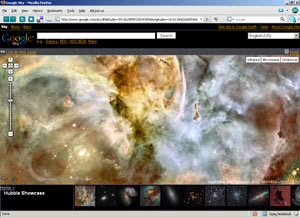
But if you want to explore the skys today.. you should head to Google Sky.. its available right now..


Google Sky

Sun
10
Feb '08

Simplicity in Technology

It is very true that simplicity in technology is very fundamental for any technology to be accepted and adopted by the general public.

The TED talk by ‘David Pogue’ – the technology columnist New York Times is very insightful, musical and outright funny.

Don’t miss this one. He talks about customer support to software upgrade and Microsoft to Google offering examples of products that celebrate the power of simplicity.

This I feel is one of the funniest talks I have seen at TED and is very informative while still being entertaining and funny.

But disagree on the drop-down list of countries design; there are many better ways of handling this. Like intelligently (ip to geo mapping) selecting the user’s country and providing option to user to edit it were in it would provide the drop-down list. And since this list are sorted alphabetically; one can type the first letter to get to the appropriate position in the list.

Tue
22
Jan '08

Flickr - history

FlickrAn idea on a gaming project led to photo website - Flickr. Check the history of Flickr @ USAToday website.

Also do check the study of technology that drives it at highscalability.com

Mon
14
Nov '05

Power to boot to Java

Recently I had a thought that, it would be nice to see once computer boot directly to a java application/server. So googled for some sort of jvm on console based os?s like dos or *uix systems. Though I found a few but most had a limited support for java?s core api.

Though this project is still in its early stages, Michael Ringgaard has
done an amazing job by building this open source [BSD style license]
project.
SanOS
Finally SanOS (Server Appliance Network Operating System) caught my attention. This is a minimalistic application server operating system kernel and allows building custom boot media (cdroom [livecd]/floppy) and can start a java application after booting.

This project has limited documentation, so it will be some time before you can boot to java, so have patience if you plan to give it a try. Also it does not yet look to be ready to put any production quality servers (no nio support, no server jvm support, no ssl, and does not handle multiple client connections well). What I did was to mount the cdrom [which had windows java jre v1.4 with QuickServer examples jars] as /usr. Then made jinit(java of sanos) as init command for the os. This worked on a few systems when I booted from floppy and I tried to make a livecd out of this, but it only worked on a virtual hardware and did not bootup when I tried on my system, may be it lacked the h/w support.

Looking forward for upcoming versions of SanOS. Also hoping to see more such kind of work on Linux or Solaris :) , may be Knoppix/BeleniX guys can come up with a slim cd version with just minimal kernel and a jvm to build java application that can boot up like ready to use (of the shelf) servers with minimum configuration or build demo systems and even some other cool stuff.

Also here you can download the QuickServer dir that I used to create a test system (QuickServerLiveCD), I had to put references to NetworkInterface under try bock since it threw Error under SanOS for some reason and it contains modified QuickServer.jar and examples configured on blocking mode with no logging. Also set org.quickserver.livecd.Welcome as your mainclass in os.ini file under [java] section.

Tue
16
Aug '05

QuickServer v 1.4.5 released

QuickServer version 1.4.5, open source Java library/framework for quick creation of robust multi-client TCP server applications is now available.

To view the features added in QuickServer 1.4.5 visit here, the main improvements have been in the following areas

  • ClientIdentifier implementation is now plug able and comes with 2 implementations.
  • PoolManager, QSObjectPoolMaker have been added to give users control of which ObjectPool implementation to be used when creating pools
  • Added a GUI Client for ChatServer.
  • Socket Timeout setting now will have to be set in milliseconds, default timeout is 1 minute.
  • And lot of improvement in implementation and bug fixes.

Download this release from: www.quickserver.org/download.html

Also based on the feedback from one of the users - ‘Filipe Sabella’, I have added a quick tutor that show how to build basic multi user tcp server -  QuickStart guide to QuickServer, do check it out.

Mon
1
Aug '05

Steve Jobs - three stories

You have got to find what you love - Steve Jobs says

Do make sure you read the very inspiring life stories of Steve Job, CEO of Apple Computer and of Pixar Animation Studios, from the text of the Commencement address by him delivered on June 12, 2005 at Stanford.

You can also watch it on YouTube

Wed
29
Jun '05

WebStart for SocketTest

JSocketTestust made a webstart version of SocketTest available, Start It now!

SocketTest is a java tool for socket testing. It can create both TCP and UDP client or server. It can be used to test any server or client that uses TCP or UDP protocol to communicate. You can download it here.

'

Trying out Solaris 10

After I heard that Solaris is now open source and was made free, I decided to take a look into one of the most admired OS for server side computing. So I went to sun‘s site for Solaris 10, and download the 5 images of installation CD and burnt them.

The system requirements look to be a bit too much i.e. you will need minimum of 256 MB of RAM to get a GUI interface. And for Java Desktop you will need 512MB RAM. Installation is pretty smooth like a Windows installation. And Java Desktop looks good and makes you comfortable. Only problem is no much GUI based system utility to change system settings like in windows and you will need to know the file names where setting are stored and have to edit them manually. This happened when I tried to configure my DNS for internet access. So it should just matter of time to just get used to this way of working with the os, but I am like it  :)

So then after a few days, I got a email about Sun’s seminar on Solaris 10 in Bangalore and registered for it and finally attended it. It was a long time since I had ever attended seminars since I used to be busy at office. So I and my friend headed to the seminar, but by the time I reached the venue it was jam packed and people were standing.. it was nice to know there were so many people who wanted to know more on Solaris in Bangalore. So then a new row of chair was added and I got my self a seat.

Seminar had a good presentation and learned about the new features offered on Solaris and I liked DTrace and Container features and though it was pretty sleek. So looking forward to test it out and also found extensive documentation on the internet and that was an added bonus.

Tue
28
Jun '05

FireFox trick to kill unwanted images/ads

FireFoxI have been playing around with FireFox for some time now and recently found a nice trick.. if you visit any site regularly and find that it displays images that irritate you or you don’t like to be displayed, just right click on the images and choose “Block images from ..” this will block all images coming from that site.. this is really cool and helps to browse faster.